Token Optimizer
Java library to optimize payload format by comparing JSON vs TOON and automatically returning the format that consumes fewer tokens for LLM API calls.

 v1.1.3
What is TOON?
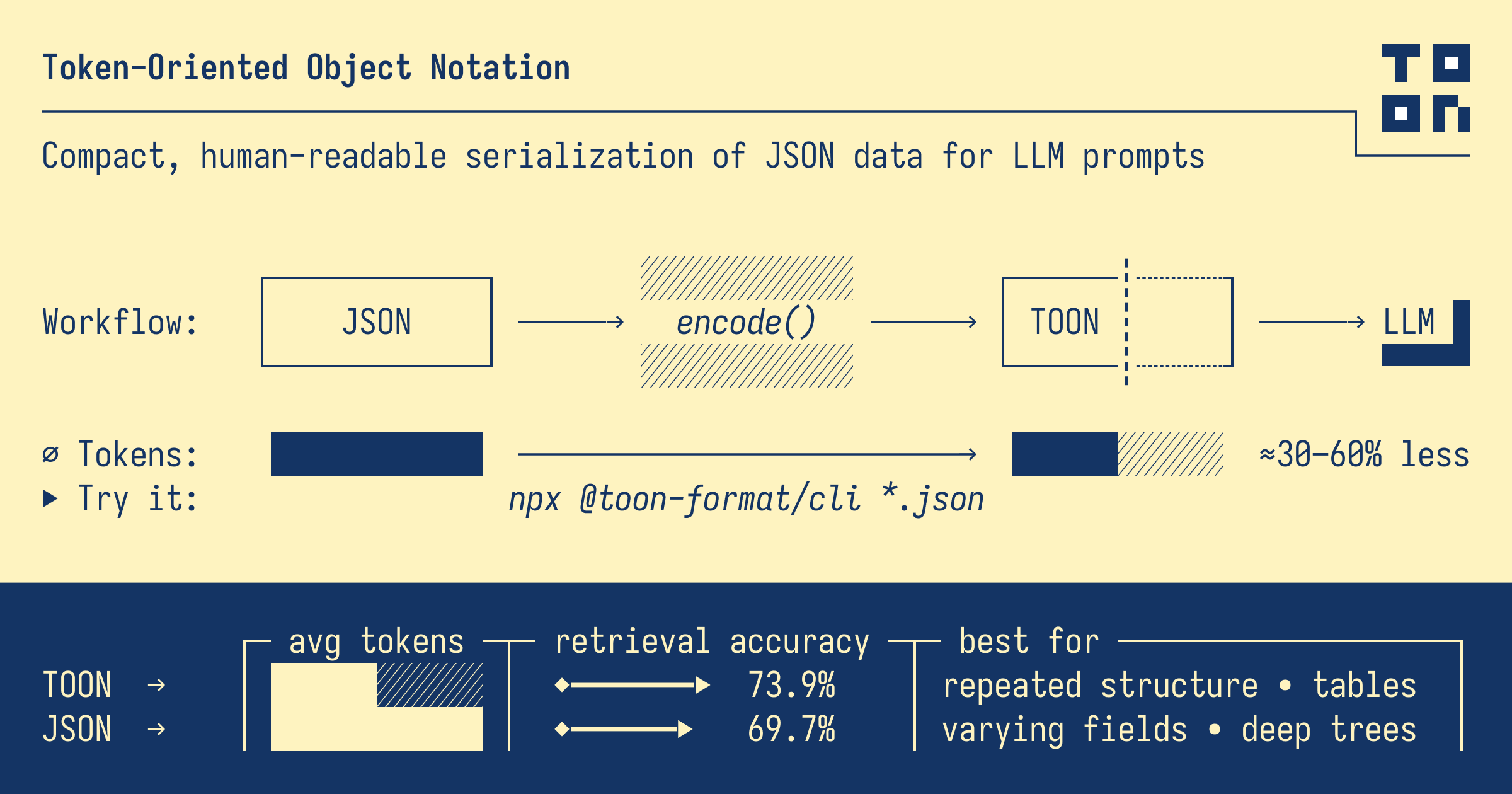
TOON (Token-Oriented Object Notation) is a compact, human-readable encoding format designed specifically for LLM prompts. It was created to reduce token consumption while maintaining the same data model as JSON.
Key Features of TOON
- Token-Efficient: Uses ~40% fewer tokens than JSON in many cases
- JSON Data Model: Encodes the same objects, arrays, and primitives as JSON
- LLM-Friendly: Explicit [N] lengths and {fields} headers provide clear schema
- Minimal Syntax: Uses indentation instead of braces, minimizes quoting
- Tabular Arrays: Uniform arrays collapse into compact table format
TOON vs JSON Example
Here's how the same data looks in both formats:
JSON Format:
{
  "users": [
    {
      "id": 1,
      "name": "John",
      "email": "john@example.com"
    },
    {
      "id": 2,
      "name": "Jane",
      "email": "jane@example.com"
    }
  ]
}
TOON Format:
users[2]{id,name,email}:
  1,John,john@example.com
2,Jane,jane@example.comWhy Token Optimizer?
When building applications with Large Language Models (LLMs), every token counts. API costs are directly proportional to the number of tokens you send. Token Optimizer helps you make the right decision automatically.
🎯 The Problem
You need to send structured data to an LLM API. Should you use JSON or TOON? The answer depends on your data structure:
- Simple objects: JSON might be more efficient
- Arrays of uniform objects: TOON can save 40-90% tokens
- Nested structures: Depends on the depth and uniformity
Making this decision manually is time-consuming and error-prone. You'd need to convert to both formats, count tokens for each, and compare.
✨ The Solution
Token Optimizer does all of this automatically:
- Converts your Java object to both JSON and TOON formats
- Counts tokens for each format (using generic estimation or model-specific tiktoken)
- Compares the results and returns the optimal format
- Provides detailed comparison information (token counts, savings, etc.)
All in a single method call! 🚀
Automatic Decision
No need to manually compare formats. The library chooses the optimal one for you.
Accurate Counting
Supports both generic estimation and model-specific tiktoken for precise token counting.
Cost Savings
Reduce API costs by automatically using the most token-efficient format.
Spec Compliant
100% compliant with the official TOON specification v2.0, validated against the official library.
Getting Started
Installation
Add the dependency to your pom.xml:
<dependency>
    <groupId>dev.sassine</groupId>
    <artifactId>token-optimizer</artifactId>
    <version>1.1.3</version>
</dependency>
📦 Available on Maven Central: View on Maven Central →
Latest version: 1.1.3 | View all releases
Basic Usage
The simplest way to use Token Optimizer:
import dev.sassine.tokenoptimizer.TokenOptimizer;
import dev.sassine.tokenoptimizer.OptimizationResult;
import java.util.HashMap;
import java.util.Map;

// Create your data object
Map<String, Object> person = new HashMap<>();
person.put("name", "John");
person.put("age", 30);
person.put("city", "New York");

// Optimize - automatically chooses JSON or TOON
OptimizationResult result = TokenOptimizer.optimize(person);

// Use the optimal format
System.out.println("Optimal format: " + result.getOptimalFormat());
System.out.println("Optimal content:\n" + result.getOptimalContent());
System.out.println("Token savings: " + result.getTokenSavings() + " tokens");Token Counting Methods
Token Optimizer supports two methods for counting tokens:
1. Generic Estimation (Default)
Fast approximation that works for any LLM model. Uses a combination of character-based and word-based estimation.
// Uses generic estimation
OptimizationResult result = TokenOptimizer.optimize(obj);
2. Model-Specific Tiktoken
Accurate token counting using the actual tokenizer for specific models (GPT-4, GPT-3.5, Claude, etc.).
Requires the jtokkit library (already included as a dependency).
import com.knuddels.jtokkit.api.ModelType;

// Use GPT-4 tokenizer
OptimizationResult result = TokenOptimizer.optimize(obj, ModelType.GPT_4);

// Use GPT-3.5 Turbo
OptimizationResult result2 = TokenOptimizer.optimize(obj, ModelType.GPT_3_5_TURBO);

// Use Claude (uses GPT-4 encoding)
OptimizationResult result3 = TokenOptimizer.optimize(obj, ModelType.GPT_4);Optimization Criteria
Choose what metric to optimize for: tokens (for LLMs), bytes (for storage), or characters (for size analysis). Different criteria can produce different optimal formats!
// Optimize by tokens (default - for LLM usage)
OptimizationResult byTokens = TokenOptimizer.optimize(person);

// Optimize by bytes (for data persistence/storage)
OptimizationResult byBytes = TokenOptimizer.optimizeByBytes(person);

// Optimize by characters (for size analysis)
OptimizationResult byChars = TokenOptimizer.optimizeByCharacters(person);

// From JSON string
OptimizationResult byBytes = TokenOptimizer.optimizeFromJsonByBytes(jsonString);
OptimizationResult byChars = TokenOptimizer.optimizeFromJsonByCharacters(jsonString);Optimization Policy
Control how the optimizer selects formats using OptimizationPolicy. This allows you to
set minimum savings thresholds or force a specific format.
import dev.sassine.tokenoptimizer.OptimizationPolicy;
import dev.sassine.tokenoptimizer.PayloadFormat;

// Create a policy with 5% minimum savings threshold
OptimizationPolicy policy = OptimizationPolicy.builder()
    .preferFormat(PayloadFormat.AUTO)              // AUTO, JSON_ONLY, or TOON_ONLY
    .minSavingsPercentForSwitch(5.0)               // Only switch if savings ≥ 5%
    .build();

// Use the policy
OptimizationResult result = TokenOptimizer.optimize(person, policy);

// Policy options:
// - PayloadFormat.AUTO: Choose format with lowest tokens (respects threshold)
// - PayloadFormat.JSON_ONLY: Always use JSON
// - PayloadFormat.TOON_ONLY: Always use TOONMultiple Metrics
Get comprehensive metrics for both LLM usage (tokens) and data persistence (characters, bytes):
OptimizationResult result = TokenOptimizer.optimize(person);

// Token metrics (for LLM usage)
int tokens = result.getOptimalTokenCount();
double tokenSavings = result.getTokenSavingsPercentage();

// Character metrics (for size analysis)
int chars = result.getOptimalCharacterCount();
double charSavings = result.getCharacterSavingsPercentage();

// Byte metrics (for data persistence/storage)
int bytes = result.getOptimalByteCount();
double byteSavings = result.getByteSavingsPercentage();

// Print all metrics
System.out.println(result);
// Output: OptimizationResult{optimalFormat=TOON, tokens=110/977/110 (savings: 867, 88.74%),
// chars=450/3200/450 (savings: 2750, 85.94%), bytes=450/3200/450 (savings: 2750, 85.94%)}Reverse Conversion (TOON → JSON/Object)
Convert TOON strings back to JSON or Java objects:
// TOON → JSON
String toonString = "name: John\nage: 30";
String json = TokenOptimizer.fromToonToJson(toonString);
// Result: {"name":"John","age":30}

// TOON → Object
Object obj = TokenOptimizer.fromToon(toonString);
// Result: Map with name="John", age=30

// TOON → Typed Class
MyClass obj = TokenOptimizer.fromToon(toonString, MyClass.class);

// Using ToonConverter directly
String json = ToonConverter.toJson(toonString);
Object obj = ToonConverter.fromToon(toonString);API Reference
TokenOptimizer Class
Main utility class with static methods for optimization.
Methods
optimize(Object obj)
Optimizes an object using generic token estimation.
OptimizationResult result = TokenOptimizer.optimize(obj);Parameters:
obj- The object to optimize (cannot be null)
Returns: OptimizationResult with optimal format and comparison data
optimize(Object obj, ModelType modelType)
Optimizes an object using model-specific tiktoken counting.
OptimizationResult result = TokenOptimizer.optimize(obj, ModelType.GPT_4);Parameters:
obj- The object to optimize (cannot be null)modelType- The tiktoken ModelType (null for generic estimation)
Returns: OptimizationResult with optimal format and comparison data
optimizeFromJson(String jsonString)
Optimizes a JSON string using generic token estimation.
OptimizationResult result = TokenOptimizer.optimizeFromJson(jsonString);optimizeFromJson(String jsonString, ModelType modelType)
Optimizes a JSON string using model-specific tiktoken counting.
OptimizationResult result = TokenOptimizer.optimizeFromJson(jsonString, ModelType.GPT_4);getOptimizedContent(Object obj)
Returns only the optimized content string (without comparison data).
String optimalContent = TokenOptimizer.getOptimizedContent(obj);optimizeByBytes(Object obj)
Optimizes an object by comparing JSON vs TOON based on byte count (UTF-8).
OptimizationResult result = TokenOptimizer.optimizeByBytes(obj);Use Case: Best for data persistence and storage optimization.
optimizeByCharacters(Object obj)
Optimizes an object by comparing JSON vs TOON based on character count.
OptimizationResult result = TokenOptimizer.optimizeByCharacters(obj);Use Case: Best for size analysis and text processing.
optimizeFromJsonByBytes(String jsonString)
Optimizes a JSON string by comparing JSON vs TOON based on byte count.
OptimizationResult result = TokenOptimizer.optimizeFromJsonByBytes(jsonString);optimizeFromJsonByCharacters(String jsonString)
Optimizes a JSON string by comparing JSON vs TOON based on character count.
OptimizationResult result = TokenOptimizer.optimizeFromJsonByCharacters(jsonString);optimize(Object obj, OptimizationPolicy policy)
Optimizes an object using the specified optimization policy.
OptimizationPolicy policy = OptimizationPolicy.builder()
    .preferFormat(PayloadFormat.AUTO)
    .minSavingsPercentForSwitch(5.0)
    .build();
OptimizationResult result = TokenOptimizer.optimize(obj, policy);
fromToonToJson(String toonString)
Converts a TOON string to JSON format.
String json = TokenOptimizer.fromToonToJson(toonString);fromToon(String toonString)
Converts a TOON string to an Object (Map/List structure).
Object obj = TokenOptimizer.fromToon(toonString);fromToon(String toonString, Class<T> clazz)
Converts a TOON string to a specific class type.
MyClass obj = TokenOptimizer.fromToon(toonString, MyClass.class);OptimizationCriteria Enum
Enum representing the criteria used for optimization comparison.
Values
TOKENS- Compare by token count (default, for LLM usage)BYTES- Compare by byte count (for data persistence/storage)CHARACTERS- Compare by character count (for size analysis)
OptimizationPolicy Class
Configuration class for controlling optimization behavior.
Builder Pattern
OptimizationPolicy policy = OptimizationPolicy.builder()
    .preferFormat(PayloadFormat.AUTO)              // AUTO, JSON_ONLY, TOON_ONLY
    .minSavingsPercentForSwitch(5.0)               // Minimum savings % to switch
    .build();
OptimizationResult Class
Contains the optimization results and comparison data.
| Method | Return Type | Description |
|---|---|---|
getOptimalFormat() |
FormatType |
Returns JSON or TOON |
getOptimalContent() |
String |
Returns the optimal format content |
getOptimalTokenCount() |
int |
Token count of optimal format |
getJsonContent() |
String |
JSON representation |
getJsonTokenCount() |
int |
JSON token count |
getToonContent() |
String |
TOON representation |
getToonTokenCount() |
int |
TOON token count |
getOptimalCharacterCount() |
int |
Character count of optimal format |
getOptimalByteCount() |
int |
Byte count (UTF-8) of optimal format |
getJsonCharacterCount() |
int |
JSON character count |
getJsonByteCount() |
int |
JSON byte count |
getToonCharacterCount() |
int |
TOON character count |
getToonByteCount() |
int |
TOON byte count |
getTokenSavings() |
int |
Absolute token savings |
getTokenSavingsPercentage() |
double |
Percentage savings (0-100) |
getCharacterSavings() |
int |
Number of characters saved |
getCharacterSavingsPercentage() |
double |
Percentage of characters saved |
getByteSavings() |
int |
Number of bytes saved |
getByteSavingsPercentage() |
double |
Percentage of bytes saved |
Examples
Example 1: Simple Object
Map<String, Object> person = new HashMap<>();
person.put("name", "John");
person.put("age", 30);
person.put("city", "New York");

OptimizationResult result = TokenOptimizer.optimize(person);

// Result: JSON (15 tokens) vs TOON (12 tokens)
// Optimal: TOON (saves 3 tokens, 20%)
Example 2: Complex Nested Structure
String jsonString = """
{
  "blog": {
    "posts": [
      {
        "id": "post-1",
        "title": "Getting Started",
        "author": "Jane Doe",
        "tags": ["tutorial", "json"]
      }
    ]
  }
}
""";

OptimizationResult result = TokenOptimizer.optimizeFromJson(jsonString);

// Result: JSON (195 tokens) vs TOON (145 tokens)
// Optimal: TOON (saves 50 tokens, 25.64%)
Example 3: Using Tiktoken for GPT-4
import com.knuddels.jtokkit.api.ModelType;

Map<String, Object> data = /* your data */;

// Use GPT-4 tokenizer for accurate counting
OptimizationResult result = TokenOptimizer.optimize(data, ModelType.GPT_4);

System.out.println("Optimal for GPT-4: " + result.getOptimalFormat());
System.out.println("Tokens: " + result.getOptimalTokenCount());
Benchmarks
Real-world test results from the library examples:
| Example | JSON Tokens | TOON Tokens | Savings | Winner |
|---|---|---|---|---|
| Simple Object | 15 | 12 | 3 tokens (20%) | TOON |
| Blog with Posts | 195 | 145 | 50 tokens (25.64%) | TOON |
| E-commerce Orders | 977 | 110 | 867 tokens (88.74%) | TOON |
TOON Specification
This library implements the official TOON specification v2.0 and has been validated against the official TOON library.
Format Rules
- Simple Properties:
key: value - Nested Objects: Indented with 2 spaces per level
- Arrays of Objects (Uniform): Compact format
[count]{prop1,prop2,prop3}: - Arrays of Objects (Non-uniform): Expanded format with
-prefix - Simple Arrays:
[count]: value1,value2,value3
For complete specification details, visit the official TOON specification.